

What WordRocket Actually Does
I’ve been testing AI writing tools for my blog, and WordRocket might be the best one I’ve found yet.
Here’s what it is: WordRocket is an AI content writer that creates SEO-optimized articles and publishes them directly to WordPress. But here’s the thing that makes it different. It uses Perplexity for research and Claude for the actual writing. That combo matters more than you’d think.
The software runs on a lifetime deal model. You pay once, use it forever. No monthly subscriptions eating into your budget.
After testing it against Koala Writer, SEO Writing, and Arvow, I think WordRocket offers the best value and overall performance. My articles cost around 15 cents each to make with this tool.
Let me show you what works, what doesn’t, and whether it’s worth your money.
How WordRocket Actually Works
The Workflow That Makes Sense
Most AI writers just use one model for everything. WordRocket splits the job between two AI systems, and that’s smart.
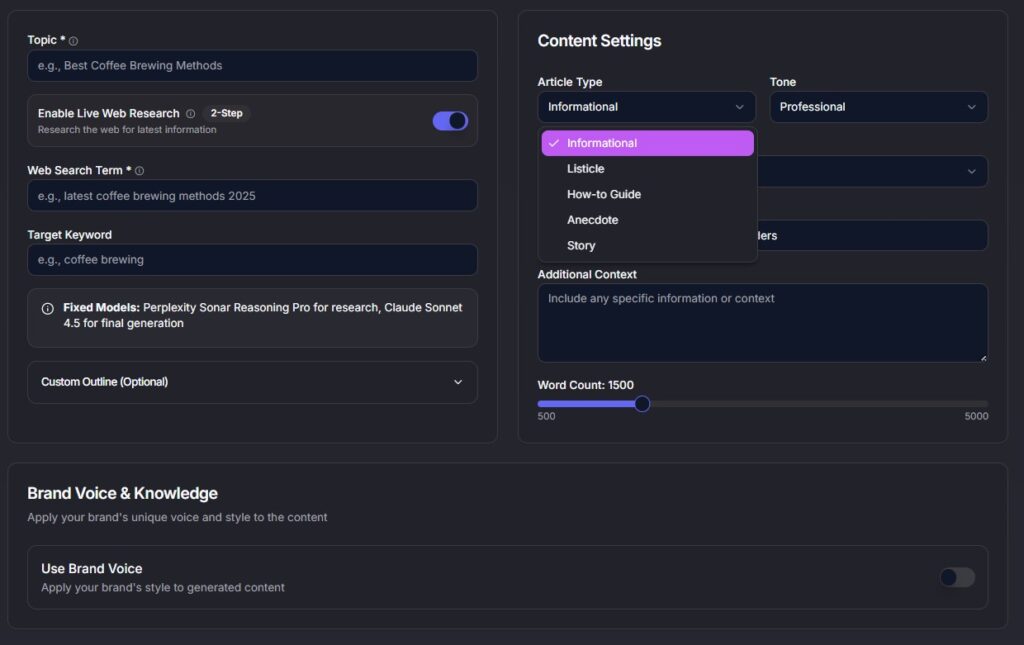
Perplexity handles the research. It pulls real-time information from the web and finds current facts. Then Claude takes over for the actual writing. Claude is one of the better AI models for creating natural-sounding content.
This two-step process gives you better results than tools that rely on a single AI model. I’ve noticed the research is more current and the writing flows better than what I get from Koala or SEO Writing.
Here’s how it works when you use it:
- Enter your keyword or topic
- Pick a template (how-to, listicle, review, etc.)
- The AI researches your topic using Perplexity
- Claude writes the article with proper structure
- You review and publish
Setup takes maybe a minute or two. The interface asks for API keys, but don’t worry. The process is quick and they walk you through it.
Direct WordPress Publishing
This is one of my favorite features. You can publish straight to WordPress with one click.
No copying and pasting. No reformatting. The article goes from WordRocket to your site with proper headings, paragraphs, and structure intact.
I’ve used other AI writers where you have to copy the content, paste it into WordPress, fix the formatting, add images manually, and basically spend 10 minutes cleaning everything up. WordRocket skips all that.
The time saved here is real. If you’re publishing multiple articles a week, this feature alone pays for itself.
Features Worth Knowing About
Brand Voice Training
This is where WordRocket gets interesting.
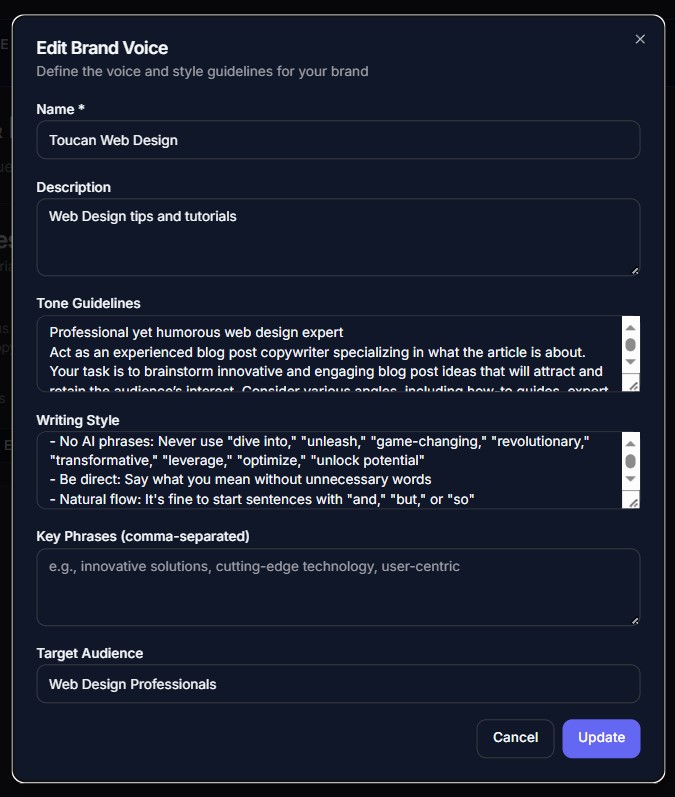
You can train the AI to write in your specific style. Upload some of your existing articles, and it learns how you write. Then it tries to match that voice in new content.
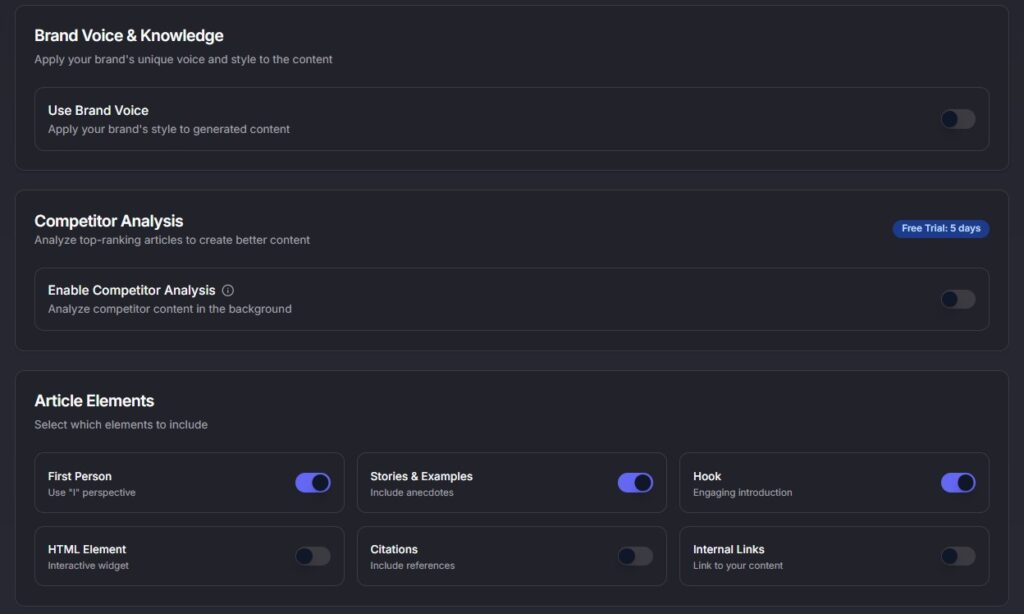
But here’s what makes this actually useful. You can give it specific instructions for each brand voice you create. Tell it to avoid em dashes. Tell it not to use emojis. Tell it to write shorter sentences or use more examples.
I’ve been using this to solve a lot of the common AI writing problems. You know those telltale signs that scream “this was written by AI”? You can prevent most of them by setting up your brand voice properly.
You get 5 brand voices with the Pro plan and 10 with Premium. So if you run multiple sites or write for different clients, you can keep each one separate with its own style rules.
Bulk Generation and Templates
WordRocket lets you upload a CSV file and generate 20+ articles at once.
This is helpful for some niches. If you’re writing general content about productivity tips, travel destinations, or basic how-to topics, bulk generation can save you hours.
But I don’t recommend it for niches that have specific details AI might get wrong.
For example, if you’re writing about software pricing (like I do), bulk generation might give you outdated numbers. Or if you’re covering technical topics where accuracy matters, you’ll spend more time fact-checking 20 articles than you would have spent writing them one at a time.
Good niches for bulk:
- General informational content
- Broad how-to guides
- List posts about common topics
- Travel or lifestyle content
Bad niches for bulk:
- Software reviews (prices and features change)
- Technical tutorials (details matter)
- Medical or legal content (accuracy is critical)
- Anything time-sensitive
The templates are solid. You get options for informational articles, listicles, product reviews, how-to guides, roundups, and ultimate guides. Each template structures the content differently, which is nice when you want variety.
Internal Linking and AI Images
WordRocket can add internal links automatically if you give it your sitemap.
The feature looks at your existing content and suggests relevant links to add in new articles. It’s not perfect, but it saves time compared to manually finding link opportunities.
The AI image generation is decent quality. The images look professional enough, but they still look AI-generated to my eyes. You can tell they’re not real photos. But for blog featured images or simple illustrations, they work fine.
You get 200 AI images per month with Pro and 300 with Premium. If you need more, you’ll probably want to supplement with stock photos or custom graphics.

What You Should Know Before Buying
It’s a New Tool
WordRocket is new software. Some things aren’t finished yet.
Pages like the changelog and documentation aren’t functioning. If you click on them, they’re basically empty or don’t exist.
The team is focusing on building the core software first. They’ll likely add the extras later. So if you’re an early adopter, you’re getting in while they’re still building out the full experience.
What does this mean for you? The main features work fine. Article generation, WordPress publishing, brand voices… all of that functions. But if you need detailed documentation or want to see a history of updates, that’s not there yet.
I’m not worried about it because the founder (Avi) is well-respected in the SEO community. He has a YouTube channel where he shares content about SEO and AI tools, and he’s committed to improving WordRocket long-term. This isn’t a quick cash grab. He’s building something that will get better over time.
Accuracy Considerations
Here’s something important: you still need to fact-check the articles.
I asked WordRocket to write about Bricks Builder (a WordPress page builder). It gave me the old pricing that had been outdated for months. The current prices have been on the Bricks website for a while, but the AI pulled old information.
This is common with most AI models. It’s not unique to WordRocket. ChatGPT does it. Gemini does it. All of them sometimes grab outdated facts or miss recent changes.
So treat WordRocket articles as drafts. Read through them. Check the important details. Make sure prices, dates, and specific claims are current.
This is why I said bulk generation can be risky in certain niches. If you generate 20 articles about software tools, you might have to fact-check 20 sets of pricing and features. That gets time-consuming fast.
For general content where small details don’t matter as much, you’re fine. For anything where accuracy is important, expect to do some editing.
Minor AI Writing Tells
The content WordRocket creates has some AI tells, but not many.
I noticed a few em dashes in the articles. Not a ton, but they’re there. Sometimes it includes emojis, which is another classic AI writing habit.
The good news? You can fix this with brand voice training. Just tell the AI in your brand voice instructions: “Don’t use em dashes. Don’t use emojis. Write in a conversational style without obvious AI patterns.”
I’ve found that helps a lot. The articles come out cleaner when you give it specific style rules to follow.
You’ll still need to edit the content before publishing. But that’s true with any AI writer. I haven’t found one yet that produces perfect, publish-ready content every time.
How It Compares to Other AI Writers
WordRocket vs Koala Writer
Koala Writer is popular in the SEO community. People use it for bulk content generation.
I think WordRocket is better for a few reasons:
First, the Perplexity + Claude combo gives you more current research than Koala’s single-model approach. I’ve compared articles on the same topic from both tools, and WordRocket pulled in newer information.
Second, the WordPress integration is smoother. Koala can export to WordPress, but WordRocket’s one-click publishing is faster and cleaner.
Third, the pricing. Koala runs on a subscription model. You’re paying monthly. WordRocket is pay-once-and-done.
Koala does have more polish in some areas since it’s been around longer. But for the core job of writing SEO content, I prefer WordRocket.
WordRocket vs SEO Writing and Arvow
SEO Writing is another subscription-based AI writer. It’s fine, but nothing special. The content quality is similar to what you get from most AI tools. Nothing about it impressed me enough to justify the monthly cost when WordRocket exists.
Arvow is newer, like WordRocket. It has some interesting features, but the pricing is higher and the output quality didn’t beat WordRocket in my testing.
Here’s the thing: all of these tools can generate decent SEO content. The differences come down to workflow, cost, and output quality.
WordRocket wins on workflow (Perplexity research + Claude writing + direct WordPress publishing). It wins on cost (lifetime deal vs subscriptions). And in my tests, it matched or beat the others on quality.
The Pricing That Changes Everything
Lifetime Deal Breakdown
WordRocket doesn’t charge monthly fees. You pay once and use it forever.
Free plan: $0
- 10 articles per month
- 20 AI images
- Basic templates
- Community support
- No credit card required
Pro: $199 one-time
- Unlimited articles
- 200 AI images per month
- 5 brand voices
- 5 sitemaps
- 5 WordPress sites
- All templates
- Bulk generation
- Competitor analysis
Premium: $249 one-time
- Unlimited articles
- 300 AI images per month
- 10 brand voices
- 10 sitemaps
- 10 WordPress sites
- All features
You can test the free plan without entering payment info. That’s worth doing before you commit to anything.
Real Cost Per Article
Here’s where the value becomes obvious.
My articles cost about 15 cents each with WordRocket. That’s counting the one-time Pro plan cost divided by how many articles I’ve generated.
Compare that to Koala Writer at $49/month. If you write 30 articles a month, that’s $1.63 per article. Every month. Forever.
Or Jasper at $49-$125/month depending on the plan. Or Surfer AI at $119/month.
Let’s say you get the WordRocket Pro plan for $199. If you write just 10 articles per month, you break even in about 3 months compared to Koala. After that, everything is basically free except your time.
I’ve generated over 100 articles with it so far. The per-article cost keeps dropping the more I use it.
This is excellent pricing. Even if WordRocket was just average quality (it’s not), the lifetime deal would make it worth considering. But it’s actually one of the better AI writers I’ve tested, which makes the pricing almost ridiculous.
The Founder and Long-Term Value
Avi, the founder, runs a YouTube channel about SEO and AI tools. He’s been around in the SEO community for a while and people respect his work.
This matters because it means WordRocket isn’t going to disappear in six months.
Some AI writing tools pop up, make quick money, and vanish when the market changes. Avi is building this for the long haul. He’s responsive to user feedback and keeps pushing updates.
The fact that documentation and changelog pages aren’t finished yet doesn’t worry me. The core product works well, and I trust that the extra features will come as the tool matures.
Reddit communities and Facebook groups have mentioned WordRocket positively. The tool has over 1,000 active users and a 4.7-star rating from 50+ reviews. That’s solid for a new product.
Who This Actually Works For
WordRocket makes the most sense for:
Bloggers and niche site builders – This is my main use case. If you’re running content sites and need to publish regularly, WordRocket speeds up the process while keeping quality decent.
Affiliate marketers – Product roundups, comparison posts, and informational content are perfect for this tool. Just fact-check the product details before publishing.
Content teams scaling production – If you’re managing multiple sites or writing for clients, the brand voice feature lets you keep each project separate with its own style.
Best niches for WordRocket:
- General informational content
- How-to guides and tutorials
- Lifestyle and travel
- Product roundups (with fact-checking)
- News and trends (if you verify facts)
When to write manually instead:
- Highly technical content requiring expertise
- Personal stories and experiences
- Opinion pieces that need a unique voice
- Content where small details are critical
- Anything requiring original research
Who should skip it:
- People who need polished documentation right now
- Writers who want 100% publish-ready content with zero editing
- Anyone working in niches where AI-generated content performs poorly
My Honest Verdict
WordRocket is likely the best value and overall best AI writer on the market right now.
The Perplexity + Claude workflow makes sense. You get better research and better writing than most competitors. The direct WordPress publishing saves real time. And the lifetime pricing is excellent compared to monthly subscriptions.
Yes, you still need to fact-check articles. Yes, there are occasional AI writing tells like em dashes or emojis. Yes, the software is new and some pages aren’t finished yet.
But the brand voice feature solves most of the AI writing problems if you set it up right. And the accuracy issues are common across all AI models, not unique to WordRocket.
For 15 cents per article, I can deal with some editing and fact-checking.
I’m using WordRocket for most of my blog content now. I write the deeply personal or technical stuff myself. Everything else goes through WordRocket first as a draft, then I edit and fact-check before publishing.
If you’re building a content site, running affiliate projects, or just trying to publish more consistently, try the free plan. See if it fits your workflow. If it does, the Pro plan at $199 is one of the better investments you can make in your content operation.
Better than Koala, better than SEO Writing, better than Arvow. That’s my take after testing all of them.
FAQ
Does WordRocket require your own API keys?
No. WordRocket includes everything in the price. You don’t need to buy API access from OpenAI, Anthropic, or anyone else. That’s built into the cost of the tool.
How long does setup take?
Maybe a minute or two. You’ll need to connect your WordPress site and set up a few preferences, but the process is straightforward. They walk you through it.
Can you prevent em dashes and emojis?
Yes. Use the brand voice feature and give it specific instructions. Tell it not to use em dashes or emojis, and it will follow those rules in your articles.
Will this content get flagged as AI-written?
Probably. Most AI detection tools will flag content from any AI writer, including WordRocket. But if you edit the content, add your own examples, and fact-check the details, it becomes harder to detect. The brand voice feature also helps make the writing less obviously AI-generated.
Does the free plan require a credit card?
No. You can sign up and use the free plan without entering payment information. You get 10 articles per month to test it out.
How accurate is the research?
It’s decent but not perfect. WordRocket uses Perplexity for research, which pulls current information from the web. But like all AI models, it sometimes grabs outdated facts or misses recent changes. Always fact-check important details like prices, dates, and statistics before publishing.
Is the lifetime deal really worth it?
Yes, in my opinion. If you write at least 10 articles per month, you’ll break even in about 3 months compared to subscription-based AI writers. After that, every article is basically free. The more you use it, the better the value gets.
Is there documentation available?
Not yet. The documentation and changelog pages aren’t functioning right now. The team is focusing on building the core software first. The tool itself works fine, but if you need detailed docs, they’re not available yet.
How does it compare to Koala Writer?
I think WordRocket is better. The Perplexity + Claude workflow gives you more current research and better writing. The WordPress integration is smoother. And the lifetime pricing beats Koala’s subscription model. Koala has more polish since it’s been around longer, but WordRocket delivers better value and quality.
Should I use bulk generation for my niche?
It depends. Bulk generation works well for general informational content, broad how-to guides, and list posts. But it’s risky for niches with specific details that AI might get wrong, like software reviews, technical tutorials, or anything time-sensitive. If accuracy matters in your niche, generate articles one at a time so you can fact-check properly.